Native macOS menu-bar utility
Edit the video. Skip the editor.
Ten focused video operations, one compact menu-bar app. Drop in a file, choose the result, and keep every frame on your Mac.
macOS 13+ · Apple Silicon · local processing
v1.0.0 · 9.3 MB ZIP · updated October 29, 2026

 FFideo
The real app
Ten direct actions. No timeline.
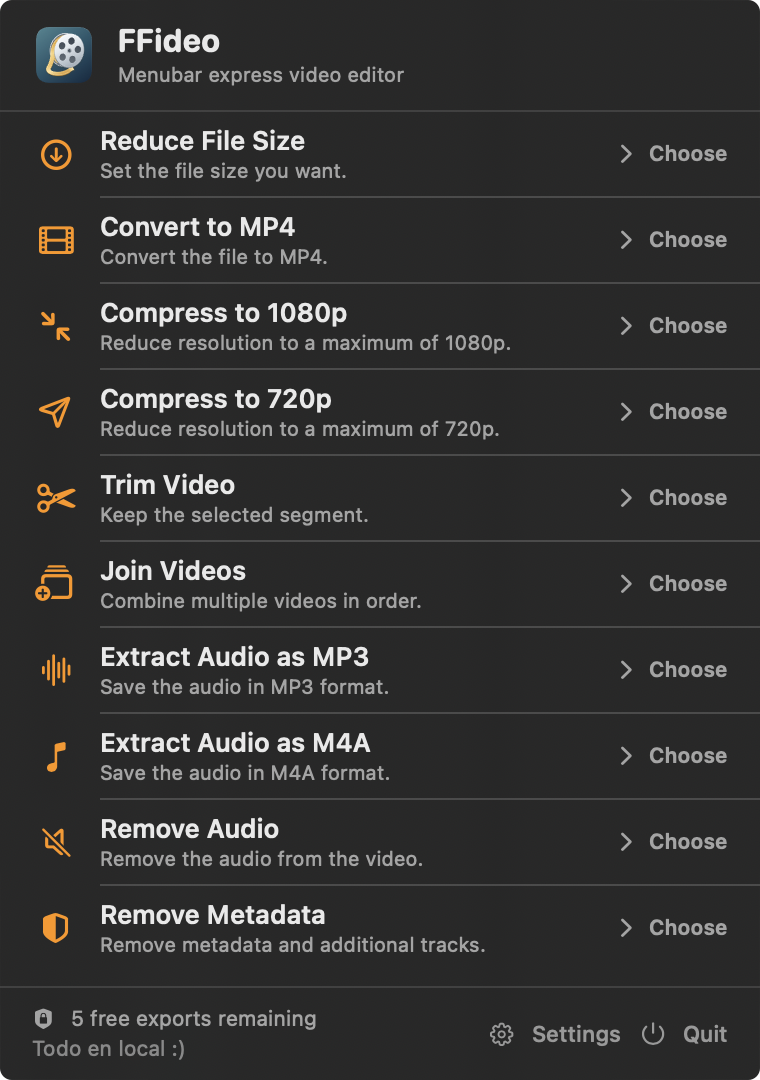
This is the actual FFideo 1.0.0 menu running on macOS. The compact 380×540 interface stays one click away in the menu bar.
A smaller surface area
The ten things you reach for.
No project setup. No cloud queue. No sprawling timeline. FFideo turns common finishing jobs into direct, named actions.
- 01Reduce File SizeChoose a maximum size.
- 02Convert to MP4Create a widely usable H.264 file.
- 03Compress to 1080pDownscale without upscaling smaller sources.
- 04Compress to 720pMake a compact sharing copy.
- 05Trim VideoKeep only the selected range.
- 06Join VideosCombine clips in your chosen order.
- 07Extract Audio as MP3Save the primary audio track.
- 08Extract Audio as M4ASave AAC audio in an M4A file.
- 09Remove AudioExport a silent MP4.
- 10Remove MetadataRemove metadata and additional tracks.
Local means local
A short path from file to result.
FFideo reads the media you select and writes the result to the local destination you choose. This public build includes no cloud processing, analytics, or advertising.
Privacy details- 1ChooseSelect a file on your Mac.
- 2ProcessFFmpeg runs inside the app bundle.
- 3VerifyThe output is checked before commit.
- 4SaveThe result lands where you chose.
Bootstrap release disclosure
Not notarized. Install deliberately.
The current artifact is ad-hoc signed and not notarized. macOS may require an explicit exception for the first launch. Do not disable Gatekeeper globally.
- Verify SHA256SUMS supplied with the release.
- Extract FFideo-1.0.0.zip.
- Move FFideo.app to Applications.
- Launch it. If macOS blocks it, open System Settings → Privacy & Security → Open Anyway.
Simple on purpose
One small tool. One small price.
FFideo Pro is US$4.99 as a one-time purchase for FFideo 1.x. Try five successful exports free before activation. No subscription.